We are constantly asked about how SharePoint can be used, so we thought we would provide a quick overview.
SharePoint is an integrated suite of applications that delivers, not just collaboration but also it has the ability to provide document management, content management of intranet, extranet and public websites, business intelligence and more. Investments are therefore limited to one integrated platform instead of several fragmented systems. The free Windows SharePoint Services 3.0 (which contains a subset of the functionality provided in the full SharePoint product) could even be considered when the requirements are limited and focus mainly on internal collaboration.
In ClearPeople’s experience, these are the following ways that companies may benefit from SharePoint:
Intranet
SharePoint provides a single point for employees to access information held on existing disparate systems. SharePoint provides a simple and familiar user experience to post internal news, weekly reports, memos and events. Employees can therefore easily add to the intranet without having to depend on IT staff.
Knowledge portal
SharePoint provides the right technological platform to capture, distribute and share knowledge. It allows entry points into the firm’s knowledge resources such as emails, useful links, colleagues’ profiles, blogs, tasks and documents. Out-of-the-box, SharePoint has many of the features required, but it can also be customised to the firm’s specific requirements. A big advantage is the tight integration with MS Office.
Document Management (DM)
SharePoint is an interesting value proposition since it does not require very specialised knowledge to implement and support. A few of the advanced DM features are not available in SharePoint but add-on components and the ability to customise SharePoint often fills the gaps.
Integration
SharePoint has an open, scalable, services-oriented architecture that provides support for standards like XML and SOAP. In non-technical jargon, this means that it is easier to integrate SharePoint with other applications. In addition, numerous IT solutions either use SharePoint as the document repository or allow for integration with web servers. This makes SharePoint an excellent platform for integrating the firm’s DMS, websites, practice management systems and more.
In summary, SharePoint has the capability to fulfill many requirements, it offers extensibility and provides the IT department with more control over business functionality. Furthermore, it reduces the costs of third party licensing and ongoing maintenance and support fees.
13 August 2008


06 July 2008
Using Content Query Web Part as a Table of Contents
The table of contents web part can be useful to display sub-sites and pages in a section. However, there is no option to display the description of these pages, so that visitors to the section can understand what the sites/pages contain. This is where the Content Query Web Part is very useful.
Step 1 - Add the Content Query Web Part to the section where you want to display a table of contents.
Step 2 - Edit the web part and select the relevant site and subsites to be displayed.
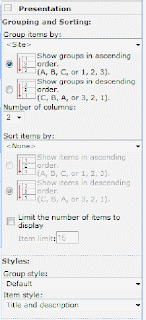
Step 1 - Add the Content Query Web Part to the section where you want to display a table of contents.
Step 2 - Edit the web part and select the relevant site and subsites to be displayed.
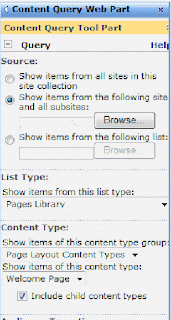 Step 3 - you may also select the following settings:
Step 4: Finally, you may also want to populate all default pages with a relevant title and description.
You can play around a little with how this looks but unfortunately there are limited default style options.
Fundi- Katya
01 July 2008
Accessibility Kit for SharePoint (AKS) 1.0
Since accessibility is very much part of what we have been providing our clients, we wanted to share information about the Accessibility Kit for SharePoint (AKS), which is available at http://www.codeplex.com/AKS. The AKS provides templates, master pages, controls, and web parts along with technical technical documentation that enable designers and developers to advance the accessibility of MOSS 2007 and WSS 3.0 based web sites and applications.
Remember this is as Microsoft describes "a set of building blocks rather than an end-to-end solution". Read more about this on: http://blogs.msdn.com/sharepoint/archive/2007/11/28/announcing-the-accessibility-kit-for-sharepoint-aks-1-0.aspx
Remember this is as Microsoft describes "a set of building blocks rather than an end-to-end solution". Read more about this on: http://blogs.msdn.com/sharepoint/archive/2007/11/28/announcing-the-accessibility-kit-for-sharepoint-aks-1-0.aspx
Subscribe to:
Posts (Atom)

 Posts
Posts

